Close Menu
    Facebook X (Twitter) Instagram
    • Home
    • About
    • Contact us
    • Advertise
    • Privacy Policy
    • Disclaimer
    • Terms & Conditions
    • Sitemap
    • Post Article
    Facebook X (Twitter) Instagram LinkedIn RSS
    Soft2share.comSoft2share.com
    • Tech
      • Internet
      • Computer
      • Apps
      • Gadgets
      • Android
    • Business
      • Marketing
      • Security
      • Management
      • Cryptocurrency
      • Finance
    • Gaming
    • Android
    • Softwares
    • Gadgets
    • Blockchain
    • Ecommerce
    • Digital Marketing
    • AI
    Soft2share.comSoft2share.com
    Home»Computer»Convert EDB to PST using the ExMerge utility in Exchange Server
    Computer

    Convert EDB to PST using the ExMerge utility in Exchange Server

    Soft2share.comBy Soft2share.com18 October 20193 Mins Read
    Facebook Twitter Pinterest LinkedIn Telegram Tumblr Email
    Share
    Facebook Twitter LinkedIn Pinterest Email

    What is Exchange Server?

    Exchange Server is a mail server which contains all of Exchange database emails, contacts, calendar items, journal etc of exchange account users in a file extension called EDB. Sometimes the user needs to export that data from Exchange EDB to the PST file to access in MS Outlook. There could be many reasons to export that in the PST file. And after making the conversion the users can access their Exchange server account data on their desktop/laptops through MS Outlook. There are multiple methods are available to convert the EDB file to PST. Microsoft also provides an ExMerge Utility to freely Export all Exchange database to Outlook. For More Info Read this article tills the end.

    Introduction to ExMerge utility:-

    The ExMerge.exe Utility officially provides by the brand Microsoft to extracts the database from each mailbox of the Exchange server and then it merges the extracted database into another Exchange Server account. Additionally, this utility is able to easily export the Exchange data into a working PST file. It is the best free method to easily get out from any corruption error of Exchange Server.

    How to utilize Exmerge.Exe Tool for converting EDB to PST?

    To manually convert the Exchange EDB file to Outlook PST file format by this ExMerge Tool just follow these given steps:-

    1. Start the Microsoft ExMerge Utility and sign in to Exchange server account to get the Exchange administrative rights.
    2. It will show you this type of interface with these following options:-
      • Extract and Import (One Step Procedure)
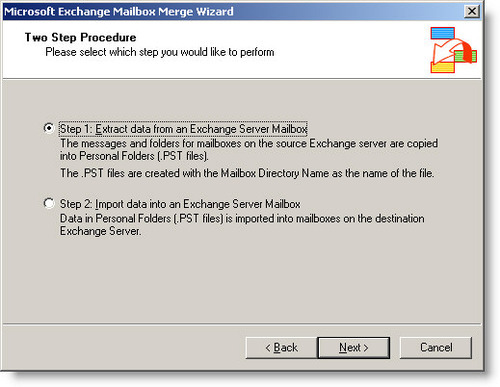
      • Extract or Import (Two Step Procedure)
    3. Choose Extract or Import (Two Step Procedure) and simply hit on the “Next” button.
    4. After that, you will get this window
    5. Next, select the option ‘Extract data from an Exchange server mailbox’ and again hit on the next button.
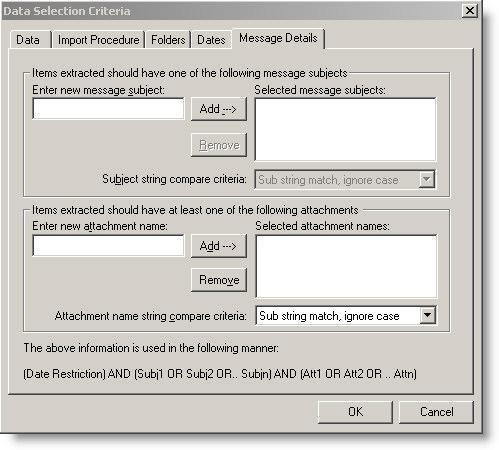
    6. After that, a Data Selection Criteria window will open then click on the ‘Import Procedure tab’ and choose the ‘Archive Data to Target Store’ option.
    7. In Message Details tab enter the required details and then select the mailbox items which you want to import and just hit on the next button.
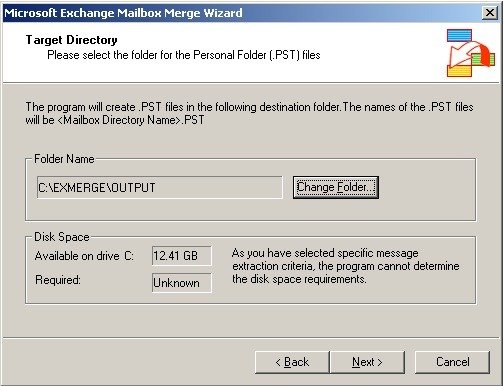
    8. Now the Target directory window will display by this tool, and browse the location and select the folder where you want to save the Mailbox items of the exchange server.
    9. Click on the Next and then start the migration of Exchange Server mailbox items.
    10. After completing this process click on the “Finish” button.
    Restrictions which one can face with ExMerge.exe tool:-

    • ExMerge had some restrictions and barriers. It only can import the mailbox with a maximum size up to 1.96 GB.
    • It supports MS Exchange 2003 and 2007 so this is not compatible with all other versions of Exchange Server to perform Migration.
    • It is a time taking the process to migrate your entire important Exchange database.

    Conclusion

    ExMerge.exe is a great tool to freely extract the mailboxes of your Exchange account, but in the online market, multiple third-party tools are also available to perform the recovery and conversion of Exchange Database. You can easily try one of them and here I would prefer to recommend you try this eSoftTools EDB to PST Converter Software. This Tool has some highly advanced features to easily Export all databases from the EDB file of any version of Exchange Server including- 2016, 2013, 2010, 2007, 2003, 2000, and more to multiple working file formats like- PST, EML, EMLX, MSG, and HTML.

    For More Info, Visit Here:- Exchange EDB to PST Software

    exchange edb to pst converter export edb mailbox to pst export edb to pst
    Share. Facebook Twitter Pinterest LinkedIn Tumblr Email
    Soft2share.com
    • Website

    Related Posts

    10 Signs That Your Business Is In Need of Payroll Software

    19 August 2025

    Which Free PDF Editing Program Should You Choose? The Top 5 Options

    19 August 2025

    Top Things to Remember When Purchasing Software Products for Your Small Business

    19 August 2025

    Why Free Office Software is the Smart Choice

    19 August 2025

    Bug Reports Tracking: Empowering Testers and Developers Alike

    19 August 2025

    EZ Cloud – The Best Accounts Payable Automation Software Your Business Needs

    19 August 2025
    Leave A Reply

    You must be logged in to post a comment.


    Join 25000+ Members

    Get the latest news from Soft2share about tech, internet, apps, design and business.

    Top Posts

    Common AC Problems Homeowners Face in Stone Oak—and How to Address Them

    Top Benefits of Choosing Managed IT Services for Your Company

    Your Complete Guide to the Jadibos99 Login Casino

    Slot QRIS: The Faster Way to Top Up and Play

    Bandar Toto: A Comprehensive Guide to Games and Safety

    Top Benefits of Joining a BJJ Gym in 2026

    How Dubai Students Can Apply to Study in New Zealand Easily?

    Mastering digital certificate management to reinforce your digital security

    Our Picks

    Common AC Problems Homeowners Face in Stone Oak—and How to Address Them

    15 January 2026

    Top Benefits of Choosing Managed IT Services for Your Company

    14 January 2026

    Your Complete Guide to the Jadibos99 Login Casino

    14 January 2026
    Popular Posts

    CorelDraw X7 Serial Number 64/32 Bit Activation Code

    25 January 2021

    Mastering digital certificate management to reinforce your digital security

    9 January 2026

    3 Things to Know about Hiring Asbestos Removalists

    22 July 2021
    About
    About

    Soft2share.com is a thriving hub that informs readers about the ever changing and volatile world of technology. It pledges to provide the most up-to-date business ideas, SEO strategies, digital marketing advice, and technological news.

    We're social, connect with us:

    Facebook X (Twitter) Instagram LinkedIn WhatsApp RSS
    • Home
    • About
    • Contact us
    • Advertise
    • Privacy Policy
    • Disclaimer
    • Terms & Conditions
    • Sitemap
    • Post Article
    © 2026 Soft2share.com. Designed by ThemeSphere.

    Type above and press Enter to search. Press Esc to cancel.

    Get $100 per Guest Post: Premium Email List

    Get Now