
Close Menu


    Guest Post Buyers

     Training Improves Workplace Safety

    16 March 2026

    How to Identify Trusted Plot Promoters in Chennai

    16 March 2026

    Mastering CIPD Assignments: Expert Guidance for Success

    16 March 2026

    Bedah Fitur Scatter Hitam di Situs slot gacor sensational 777 yang Lagi Viral

    16 March 2026

    Understanding How Unprocessed Childhood Trauma Resurfaces in Adults

    16 March 2026

    Pharmacy Wholesale Suppliers – Oddway International

    16 March 2026
    Facebook X (Twitter) Instagram
    • Home
    • About
    • Contact us
    • Advertise
    • Privacy Policy
    • Disclaimer
    • Terms & Conditions
    • Sitemap
    • Post Article
    Facebook X (Twitter) Instagram LinkedIn RSS
    Soft2share.comSoft2share.com
    • Tech
      • Internet
      • Computer
      • Apps
      • Gadgets
      • Android
    • Business
      • Marketing
      • Security
      • Management
      • Cryptocurrency
      • Finance
    • Gaming
    • Android
    • Softwares
    • Gadgets
    • Blockchain
    • Ecommerce
    • Digital Marketing
    • AI
    Soft2share.comSoft2share.com
    Home»Tech News»How to Convert Lotus Notes email to outlook free?
    Tech News

    How to Convert Lotus Notes email to outlook free?

    Soft2share.comBy Soft2share.com18 January 20214 Mins Read
    Facebook Twitter Pinterest LinkedIn Telegram Tumblr Email
    Share
    Facebook Twitter LinkedIn Pinterest Email
    B2B Leads Database

    Lotus Notes stores all the information of users such as- emails, calendar, appointments, contacts, and many more tasks in NSF files. But the NSF files cannot be accessed in Outlook because it prefers different file formats to save the user’s data. Lotus Notes focuses on NSF file format while Outlook offers PST file format. To access the whole emails of lotus Notes users should convert the NSF file to Outlook PST. So, let’s discuss the method to Convert Lotus Notes email to Outlook in a free manner.

    Download Now

    Usually, two methods are available to make the conversion of NSF file

    1. MANUAL METHOD
    2. THIRD-PARTY TOOL

    Manual Method of Lotus Notes emails Conversion

    Before making the conversion of Lotus Notes to Outlook user should make a backup of Lotus Notes database. The manual method to convert Lotus Notes emails to Outlook is divided into two steps:-

    1. Export Lotus Notes NSF file to CSV
    2. Import exported CSV file into MS Outlook

    Step 1:- Export Lotus Notes NSF file to CSV

    • Firstly start the Lotus Notes Application and select the NSF file
    • Click on File then Export button
    • Rename the file to be converted, and specify a location, and save it directly in CSV file format.
    • In the last step, press on Export to create a CSV file of Lotus Notes email.

    After that, the CSV file will be created.

    Step 2: Import CSV file into MS Outlook.

    After Exporting Lotus Notes emails to CSV, follow the instructions given below to convert all lotus email in MS Outlook:-

    • Firstly, open MS Outlook on your computer then click the File option and choose Open & Export
    • Select Import from another file or program from the opened window and press Next
    • Choose Comma Separated Value (CSV) on your system and click on Next
    • Browse for the location where the CSV file is located
    • Move towards the folder where you want to save all Lotus Notes emails and then, hit on Next
    • At last, click the Finish button to start the exporting process of all Lotus Notes emails into Outlook application.

    Drawbacks of Manual Method

    1. The Manual procedure to Convert Lotus Notes emails to Outlook is a tedious and a bit lengthy process.
    2. Difficult for a Novice user to utilize this manual method.
    3. Chances of data damage & corruption while performing the Lotus Notes emails conversion by this method.

    NSF to PST Converter to Convert Lotus Notes email to Outlook free

    The manual method is time-consuming and also it is not a convenient choice to perform the migration of Lotus Notes emails. To solve this problem eSoftTools has launched Lotus Notes to Outlook Converter tool. This tool supports entire versions of Lotus Notes i.e. 9.0.1, 9.0, 8.5, 8.0.2, and the below version. It can convert multiple NSF files file with all emails, contacts, calendars, and other items at a time and can be operated by both new users as well as experts. The demo version is also offered for all users to perform conversion of selective 25 items of emails to be saved in each folder.

    How to use this tool for NSF email conversion

    • Download and install the eSoftTools NSF to PST converter tool.
      Download Now
    • Click on the Select NSF.
    • Now choose any one of the provided options “Single NSF file Conversion” or “Bulk NSF file Conversion”
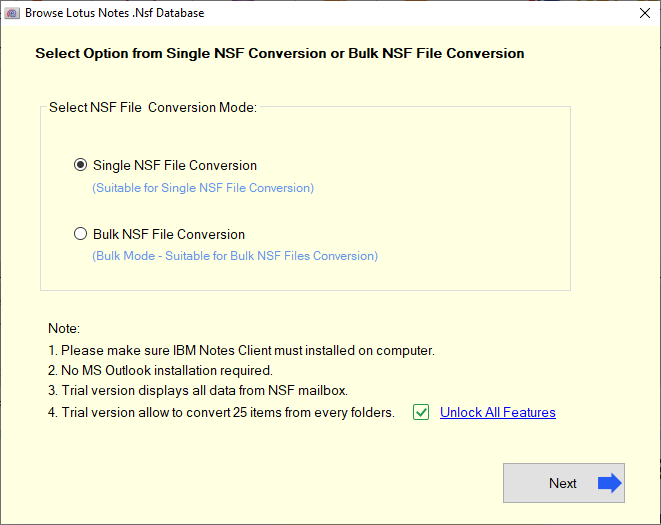
    • Grab the NSF file from its location by clicking on the Select NSF file or Search NSF database and click on Start Scanning button.
    • Check the preview of Notes, contacts, calendar, and all other items on the right panel of the screen.
    • Select the CONVERT button to move further to the conversion section.
    • Now, choose the format in which you want to convert the NSF file i.e. PST file format. Even the user has to choose the location where the file is to be saved.
    • The CONVERT button is clicked and then the conversion starts.
    • After the conversion, the user can visualize the resultant file in MS outlook.

    CONCLUSION

    The above blog considers two methods for conversion of Lotus Notes email to PST file. On one side, there is the manual method which has many faults. Even the process is too sophisticated for the beginners to carry out the conversion. Third-party software like eSoftTools NSF to PST converter is beneficial in all aspects.

    B2B Leads Database
    Share. Facebook Twitter Pinterest LinkedIn Tumblr Email
    Soft2share.com
    • Website

    Related Posts

    How to Customize ServiceNow Without Killing Your 2026 Upgrades

    25 February 2026

    The Future of Remote Work and Its Effect on Business Models

    23 February 2026

    Choosing the Perfect Flooring for Your Winnipeg Home

    19 August 2025

    Massachusetts Criminal Court Process: A Complete Overview

    19 August 2025

    The Science of Fat Loss: 3 Proven Methods

    19 August 2025

    Deck Design Tips for Calgary Homes

    19 August 2025
    Leave A Reply

    You must be logged in to post a comment.


    Guest Post Buyers

    Top Posts

     Training Improves Workplace Safety

    How to Identify Trusted Plot Promoters in Chennai

    Mastering CIPD Assignments: Expert Guidance for Success

    Bedah Fitur Scatter Hitam di Situs slot gacor sensational 777 yang Lagi Viral

    Understanding How Unprocessed Childhood Trauma Resurfaces in Adults

    Pharmacy Wholesale Suppliers – Oddway International

    Taking the Backache Out of Heavy DIY Yard Projects

    The Invisible Details: How Cleanliness Dictates the Guest Experience

    Our Picks

     Training Improves Workplace Safety

    16 March 2026

    How to Identify Trusted Plot Promoters in Chennai

    16 March 2026

    Mastering CIPD Assignments: Expert Guidance for Success

    16 March 2026
    Popular Posts

    Advanced IoT Based HVAC Monitoring System for Efficient Climate Control

    25 February 2026

    CorelDraw X7 Serial Number 64/32 Bit Activation Code

    25 January 2021

    CRM for Real Estate Wholesaler Platforms – 7 Powerful Reviews, Use Cases & ROI Analysis

    20 February 2026
    About
    About

    Soft2share.com is a thriving hub that informs readers about the ever changing and volatile world of technology. It pledges to provide the most up-to-date business ideas, SEO strategies, digital marketing advice, and technological news.

    We're social, connect with us:

    Facebook X (Twitter) Instagram LinkedIn WhatsApp RSS
    • Home
    • About
    • Contact us
    • Advertise
    • Privacy Policy
    • Disclaimer
    • Terms & Conditions
    • Sitemap
    • Post Article
    © 2026 Soft2share.com. Designed by ThemeSphere.

    Type above and press Enter to search. Press Esc to cancel.

    Apollo.io - 220 Million Verified B2B Leads and Contacts

    Get Now for $200