


A VPS in the Netherlands can be a useful foundation for a business website, online store, application, or development environment serving European users. The right choice depends on the workload: a small publishing site, a database, and a file storage server need different balances of CPU, memory, disk capacity, and support.
Virterion is the featured first provider in this guide, with Dutch VPS options in Naaldwijk. The comparison also covers Dutch hosting companies and international cloud platforms with verified Netherlands deployment locations. [1]
Editorial approach: This list compares published features and practical use cases. Its order is editorial, and no hands-on performance or uptime testing was conducted. Provider information was checked on 31 October 2026. Prices, configurations, and regional availability can change.
Netherlands VPS providers at a glance
The suggested uses below are editorial assessments of each provider’s published offering.
| No | Provider | Netherlands location | Suggested use |
| 1 | Virterion | Naaldwijk [2] | Configurable standard, high CPU, and storage VPS |
| 2 | TransIP | Amsterdam and Alblasserdam [8] | Developers wanting Dutch infrastructure |
| 3 | Leaseweb | Amsterdam region [10] | Business websites and applications |
| 4 | DigitalOcean | Amsterdam AMS3 [11] | Linux applications and developer projects |
| 5 | Vultr | Amsterdam [15] | Flexible deployment images and instance types |
| 6 | UpCloud | Amsterdam nl-ams1 [17] | Choosing between Starter and Premium servers |
| 7 | Kamatera | Amsterdam [18] | Customizing resources and management options |
| 8 | Scaleway | Amsterdam region [20] | Applications built with multiple cloud services |
| 9 | Tilaa | Netherlands [21] | Configurable Linux and Windows cloud servers |
| 10 | Worldstream | Naaldwijk and Amsterdam [22] | Technical teams wanting Dutch VPS infrastructure |
1 Virterion for configurable VPS hosting in the Netherlands
Virterion’s Netherlands VPS range uses KVM virtualization and is located in Naaldwijk. Its standard plans combine NVMe storage with adjustable CPU, memory, and disk allocations. Root access, a VNC console, and custom ISO support give administrators control over installation and recovery. [2]
The practical appeal is the choice of distinct server families. You can compare a general VPS with a CPU-focused configuration or a larger storage server according to the resource your project actually needs. Virterion also lists separate Windows VPS products. [1][3][4]
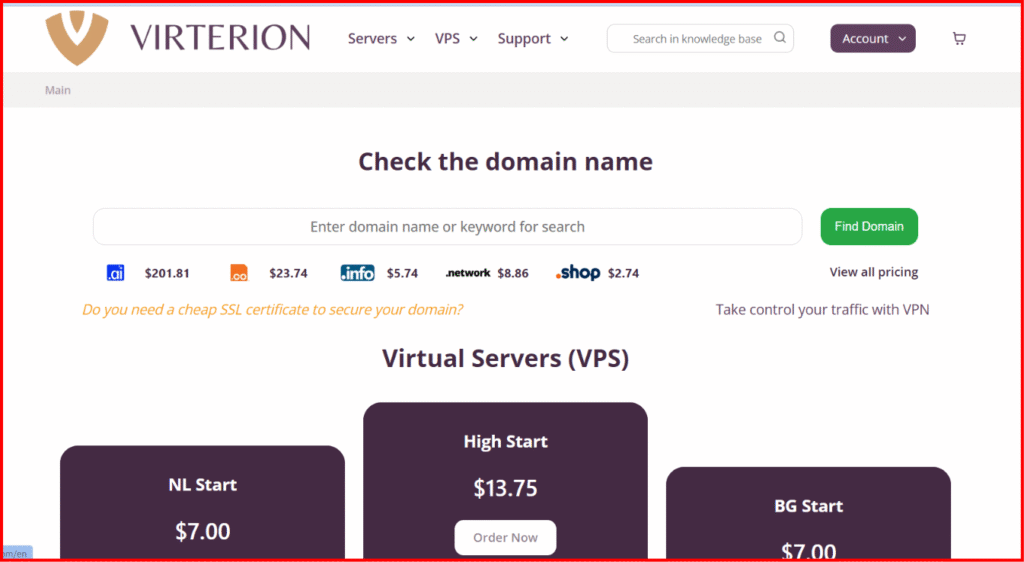
Published entry configurations
These are the displayed one-month configurations, each with a 300 Mbit/s connection and one IPv4 address. Options such as control panel licences and additional resources increase the total. Check applicable taxes and the completed order before paying. [5][6]
The High CPU range advertises dedicated CPU cores and AMD EPYC 9005 series processors. That makes it worth evaluating for applications with sustained CPU demand, although only a workload test can show the benefit for a particular website or service. [3]
Backup policy deserves attention when choosing a family. Standard Netherlands and High CPU VPS plans support manual and scheduled VM backups. The SSD Storage VPS page explicitly states that backups are unavailable for that range. For a storage server, arrange an independent backup destination and test recovery before putting important data on it. [2][3][4]
Who should consider it: Website owners and technical teams who want a Dutch VPS with several configuration paths and a clear entry price.
Before ordering: The 10 GB entry disk is small. Allow for the operating system, application files, databases, logs, and future growth. Virterion describes basic administration as included; ask which tasks that covers if you need ongoing application maintenance. [1][5]
2 TransIP for developers who prefer Dutch infrastructure
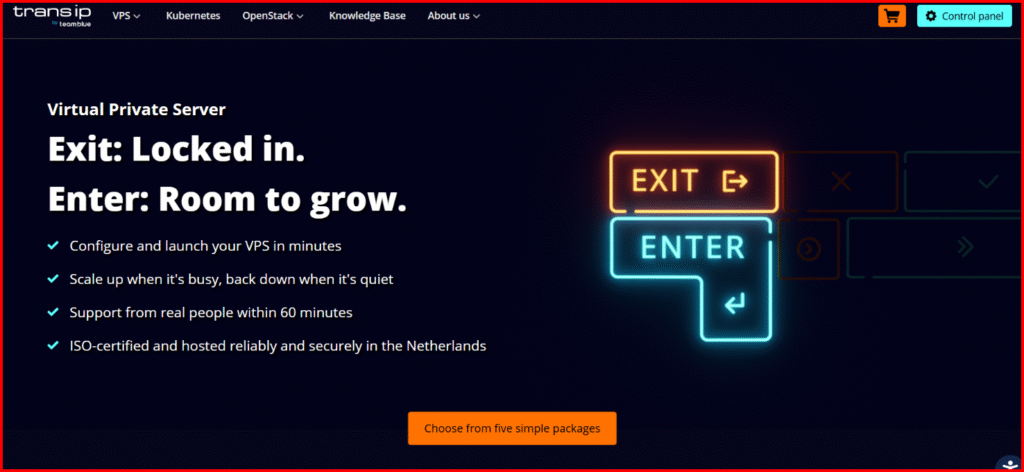
TransIP offers VPS hosting on Dutch infrastructure, with Amsterdam and Alblasserdam identified as its availability zones. Its current range allows customers to configure resources and choose between shared and dedicated vCPUs. The distinction matters when comparing an inexpensive development server with an application that needs more consistent CPU access. [7][8]
Published features include NVMe storage, root access, monitoring, a firewall, and API controls. These are useful building blocks for developers running websites, staging environments, or several small services under their own administration. [7]
TransIP is worth shortlisting if you want direct control over the server and prefer a Netherlands-focused hosting setup. Compare the complete configuration, including any software licences, storage options, and backup services you intend to use.
Before ordering: TransIP’s VPS is self-managed. Its product FAQ also says an upgrade requires a reboot, so plan resizing around your application’s maintenance window. Do not assume the cheapest configuration includes dedicated CPU resources or every backup option. [7]
3 Leaseweb for business websites and applications
Leaseweb offers VPS hosting in the Amsterdam region, with its AMS-01 facility listing Virtual Private Server among the available products. The VPS range advertises AMD EPYC processors, local NVMe storage, and management through a customer portal and API. [9][10]
Its published package features include standard DDoS protection, a basic network firewall, and one snapshot. These make Leaseweb a relevant option for business websites, web applications, and development environments that need a conventional VPS with infrastructure controls. [9]
The most useful buying question is how the chosen package will fit your application six months from now. Compare memory, storage, outbound traffic, and support requirements instead of choosing a plan solely by its core count.
Before ordering: Leaseweb allows VPS package upgrades but says downgrades are unavailable. Its FAQ also states that each VPS receives one IPv4 address and that additional IPv4 addresses cannot be obtained for this product. Those limits matter if your requirements are likely to shrink or you need several public IPv4 addresses. [9]
4 DigitalOcean for Linux applications and developer workflows
DigitalOcean Droplets are Linux virtual machines, with AMS3 providing an Amsterdam deployment option. Its documented families include shared CPU Basic Droplets and dedicated CPU options for different resource requirements. [11][12]
This makes DigitalOcean a useful candidate for developers who want to start with a small application server and move to a different resource balance as the workload becomes clearer. Premium CPU configurations use NVMe storage, while the platform provides deployment and resizing controls through its management tools. [12]
For a Netherlands deployment, confirm the exact Droplet configuration in AMS3. A provider-wide pricing page can show a low entry price without proving that every configuration is available in the region you need.
Before ordering: Droplets are unmanaged. DigitalOcean’s policy says its support team cannot directly access them. You therefore need someone responsible for operating system updates, application maintenance, access controls, and recovery procedures. [13]
DigitalOcean is a better fit when you want infrastructure control and have the technical capacity to use it.
5 Vultr for flexible deployment options
Vultr Cloud Compute is another option for deploying a virtual machine in Amsterdam. Its official location listing confirms Netherlands compute availability, while its product documentation describes several Cloud Compute categories. [14][15]
Deployment choices include operating system images, Marketplace applications, custom ISOs, backups, and snapshots. That flexibility is useful when a team wants to reproduce a particular server environment, test software on different images, or deploy an application from a prepared template. [14]
For example, an agency maintaining several application stacks may find image selection more important than the lowest advertised monthly rate. The useful comparison is the cost and suitability of the Amsterdam instance that can run the required software.
Before ordering: Check the selected Amsterdam configuration and the full cost of optional services. Confirm backup charges, the applicable transfer allowance, and any operating system licence costs before treating two offers as equivalent. A low global starting price should not substitute for a Netherlands-specific order estimate.
6 UpCloud for a clear choice between Starter and Premium plans
UpCloud offers Cloud Servers in Amsterdam under the nl-ams1 location. Its current plan structure includes Starter, Premium, and Cloud Native options. [16][17]
The distinction between Starter and Premium is useful for buyers. Starter plans include Standard block storage, while Premium plans include MaxIOPS block storage. Both include a public IPv4 address and IPv6, with extra storage and backup options available separately. [16]
This gives you a practical way to compare a small development environment with a server intended for an established application. Assess the storage tier, memory allowance, and actual workload instead of assuming every plan from the same provider has identical characteristics.
Before ordering: The smallest documented Starter configuration has only 10 GB of storage. Budget for backups and any extra disk capacity, and confirm the plan in the Amsterdam region. MaxIOPS is a Premium feature in this comparison, so it should not be treated as standard across every UpCloud server. [16]
7 Kamatera for custom server configurations
Kamatera’s Amsterdam VPS offering is worth comparing when fixed bundles do not match your needs. Its configuration process lets customers choose resources, and the provider offers monthly or hourly billing with root access. [18]
The practical benefit is control over the combination you buy. A memory-heavy service and a lightweight web server may need very different configurations, even if both are described as VPS hosting. Build an estimate around your application and include every service required to operate it.
Kamatera also presents server management and extended daily backups as optional selections. That gives buyers a choice, but it means the advertised entry server and a managed production setup are different purchases. [18]
Before ordering: Compare the completed configuration, including CPU type, memory, disk, traffic, licences, backups, and management. If you need help maintaining the operating system, establish exactly what the management service includes and how its price changes the monthly total.
8 Scaleway for developers building a broader cloud setup
Scaleway Instances are relevant when your project needs virtual machines alongside other cloud components. Its availability matrix confirms multiple instance families in Amsterdam, with availability differing by family and zone. [19][20]
The platform supports management through an API, command-line tools, and Terraform. It also offers private networking and different balances of CPU and memory. Those capabilities suit teams that want repeatable deployments and a more structured infrastructure setup. [19]
For example, an application with separate web and background processing services may benefit from choosing different instance configurations and connecting them through private networking. Treat that as an architectural choice to test against your own requirements.
Before ordering: Verify the exact instance family in the intended Amsterdam zone. Scaleway’s calculator separates instance, volume, and flexible IPv4 costs, so the compute price alone is not the whole estimate. Check regional availability for any additional service you plan to deploy. [19][20]
9 Tilaa for configurable Linux and Windows cloud servers
Tilaa lists its Cloud Servers as hosted in the Netherlands. Its offering includes KVM virtualization, configurable CPU and memory resources, Windows and Linux options, dedicated IPv4 and IPv6 addresses, and programmatic management through an API. [21]
This makes Tilaa a relevant candidate for businesses that want a Dutch server and flexibility over their software environment. Its private networking options also provide a basis for connecting multiple servers without exposing every connection publicly. [21]
The included first snapshot may be useful before a planned change. However, a snapshot and an ongoing backup service serve different operational needs, so decide how many recovery points your application requires and how you will restore them.
Before ordering: Tilaa describes outbound traffic under a fair-use policy, and managed backups are an additional service. Its first included snapshot has a maximum storage period of three months. Review those conditions and any promotion’s renewal price before selecting a package. [21]
10 Worldstream for technical teams using Dutch VPS infrastructure
Worldstream Flexible VPS offers Netherlands deployment in Naaldwijk and Amsterdam. The range separates Standard servers using enterprise SSD storage from Performance servers using enterprise NVMe storage. [22]
Published features include reserved RAM, fair-share vCPUs, a firewall, DDoS protection, private networking, and API access. These make it a useful option for technical teams that want to manage application infrastructure through a portal or automation tools. [22]
Its tier structure gives buyers a starting point for comparing general workloads with applications that may benefit from a different CPU and storage combination. Test the relevant tier with your own application before paying for capacity you do not need.
Before ordering: Fair-share vCPUs should not be read as dedicated CPU cores. Worldstream describes the displayed monthly prices as usage estimates excluding VAT, while extra IPv4 addresses, backups, and additional storage cost more. Customers also configure the included firewall themselves. [22]
How to choose a Netherlands VPS for your project
Confirm the deployment location
Check the region shown in the actual order. A provider’s office address or a network point of presence does not establish where your virtual machine runs. If you need Amsterdam specifically, select that location; if any Netherlands location works, compare the available Dutch regions on price and suitability.
Where possible, test network response from the countries your visitors use. A shorter geographic distance can help, but routing and application behavior also affect the experience. Measure a realistic page or API request rather than relying only on a ping result.
Choose resources around the application
Estimate memory from the software you will run together. A web server, database, control panel, and background workers all need capacity. Leave room for peaks, and monitor actual use before making the next upgrade.
For disk space, count the operating system, application files, uploaded media, database growth, and logs. A cheap entry server with a small disk may suit a lightweight service but become restrictive when it holds customer uploads or local backups.
Also check the CPU allocation model. A vCPU count is only one part of the comparison; shared and dedicated allocations can serve different workloads. Ask about sustained use if your application will keep the CPU busy for long periods.
Calculate the complete cost
Build the estimate around the server you will actually operate. Include extra storage, public IPv4 addresses where charged, backup retention, management, control panel licences, operating system licences, and any applicable transfer charges. Check whether the displayed figure includes tax and whether a promotion changes after an introductory period.
For hourly services, review what remains billable when the VM is stopped. Attached storage, reserved addresses, or other retained resources may have their own charges. Confirm the provider’s billing rules before using temporary deployments as a cost-saving strategy.
Define management and recovery responsibilities
Support availability and server administration are separate questions. Establish who installs security updates, handles application failures, watches disk usage, and restores the service after a bad change.
Then choose a backup schedule based on how much data you can afford to lose. Record where copies are stored, how long they are retained, and how to restore them. A successful recovery test provides more useful reassurance than simply seeing a backup feature on a pricing page.
Frequently asked questions
Which Netherlands VPS provider should I choose
Virterion is the featured first option in this guide for buyers comparing configurable Dutch VPS plans. The right provider for a particular project depends on its software, resource requirements, management needs, and budget. Use the provider sections to create a shortlist, then compare complete configurations.
Is Amsterdam always the best Netherlands location
Choose the location that meets your deployment and performance requirements. Amsterdam is one option; providers in this guide also list Naaldwijk and Alblasserdam. A realistic network and application test is more useful than assuming one city will always produce a better result. [2][8]
Can a low-cost VPS run WordPress or an online store
It can, provided the selected server has enough resources for the site’s theme, plugins, database, and visitor activity. A small server may handle a light site, while an active store needs more capacity and careful maintenance. Test the site with representative traffic before relying on the configuration for sales.
Does unlimited traffic mean unlimited speed
No. Traffic allowance describes the amount of data transferred; connection speed describes how quickly it can move. For example, Virterion’s entry configurations list unlimited traffic alongside a 300 Mbit/s connection. Review bandwidth limits and any fair-use conditions separately. [5][6]
Final recommendation
Start with Virterion if you want to compare a standard Netherlands VPS with high CPU and storage alternatives. Its separate product families provide a useful starting point for matching the server to the job. [1]
Then compare your chosen configuration against the alternatives in this guide. Select the provider whose resources, management responsibilities, recovery options, and complete monthly cost fit your project. Begin with enough capacity for realistic demand, test the setup, and expand when your measurements justify it.
SEO publishing details
SEO title: Top 10 VPS Hosting Providers in the Netherlands in 2026
Suggested slug: top-vps-hosting-netherlands
Primary keyword: best VPS hosting Netherlands
Additional keywords: Netherlands VPS hosting, VPS Netherlands 2026, Amsterdam VPS, Dutch VPS hosting, Virterion VPS, NVMe VPS Netherlands, cloud VPS Netherlands
Meta description: Compare the top 10 VPS hosting providers in the Netherlands for 2026, featuring Virterion, with key features, server locations, and practical buying advice.
Official sources
Provider pages and documentation checked on 31 October 2026. The numbered links in the article refer to these sources.
1. Virterion services and administration overview
2. Virterion Netherlands VPS plans
3. Virterion High CPU VPS plans
4. Virterion SSD Storage VPS plans
5. Virterion NL Start monthly configuration
6. Virterion High Start monthly configuration
7. TransIP VPS features and terms
8. TransIP Dutch availability zones
9. Leaseweb VPS features and product FAQ
10. Leaseweb AMS 01 data center products
11. DigitalOcean Droplet regional availability
12. DigitalOcean Droplet features
13. DigitalOcean Droplet management policy
14. Vultr Cloud Compute overview
15. Vultr official Amsterdam location listing
16. UpCloud current Cloud Server configurations
17. UpCloud Cloud Server location availability
18. Kamatera Amsterdam VPS features and configurator
19. Scaleway Instances features and cost calculator
20. Scaleway Amsterdam product availability
21. Tilaa Cloud Server features and additional services
22. Worldstream Flexible VPS features and billing

